How years of oyster-farming experience, a map-first idea and a different way of building software came together in a working product.
There's a particular kind of frustration that comes from knowing exactly what you need a piece of software to do, then discovering that the software seems to have been designed by someone who's never done the job.
In oyster farming, the gap between a tidy spreadsheet and what's actually happening on the water can be enormous.
A farm isn't just a list of stock. It's a collection of leases, rows, lines, equipment, batches and constant movements. Stock is deployed, handled, graded, picked up and moved again. Space that looks available on paper may already be occupied. Knowing how much stock you have is one question. Knowing precisely where it is is another.
FarmTide began with that distinction.
I wanted to build an oyster-farm management system that felt like it belonged on a farm, not in a corporate boardroom. Something that could show a farmer what was on the water, where it was, and what room they had left—without making them fight the software to find out.
This is the development story behind FarmTide, a live product I built as its founder. It's also one of the clearest demonstrations of the thinking behind SparkAhead: start with a real problem, use modern tools to move quickly, and put the work into making the result genuinely useful.
To be clear, FarmTide is a founder-built product, not a commissioned SparkAhead client project. I'm sharing it because building and operating real software is a good way to show how I approach development.
1. Start with the work, not the software
I've spent roughly 25 years around the oyster industry. I've seen the daily operations, the interruptions, the practical shortcuts and the very real consequences of not knowing where stock is or what has happened to it. I've also built farm software before, so I knew both sides of the problem: what farmers need and how easily software can become too complicated for the people using it.
That experience shaped the first question.
Not 'What features do farm-management platforms normally have?'
But 'What does someone running an oyster farm actually need to see when they open the app?'
For me, the answer was straightforward: show me the farm.
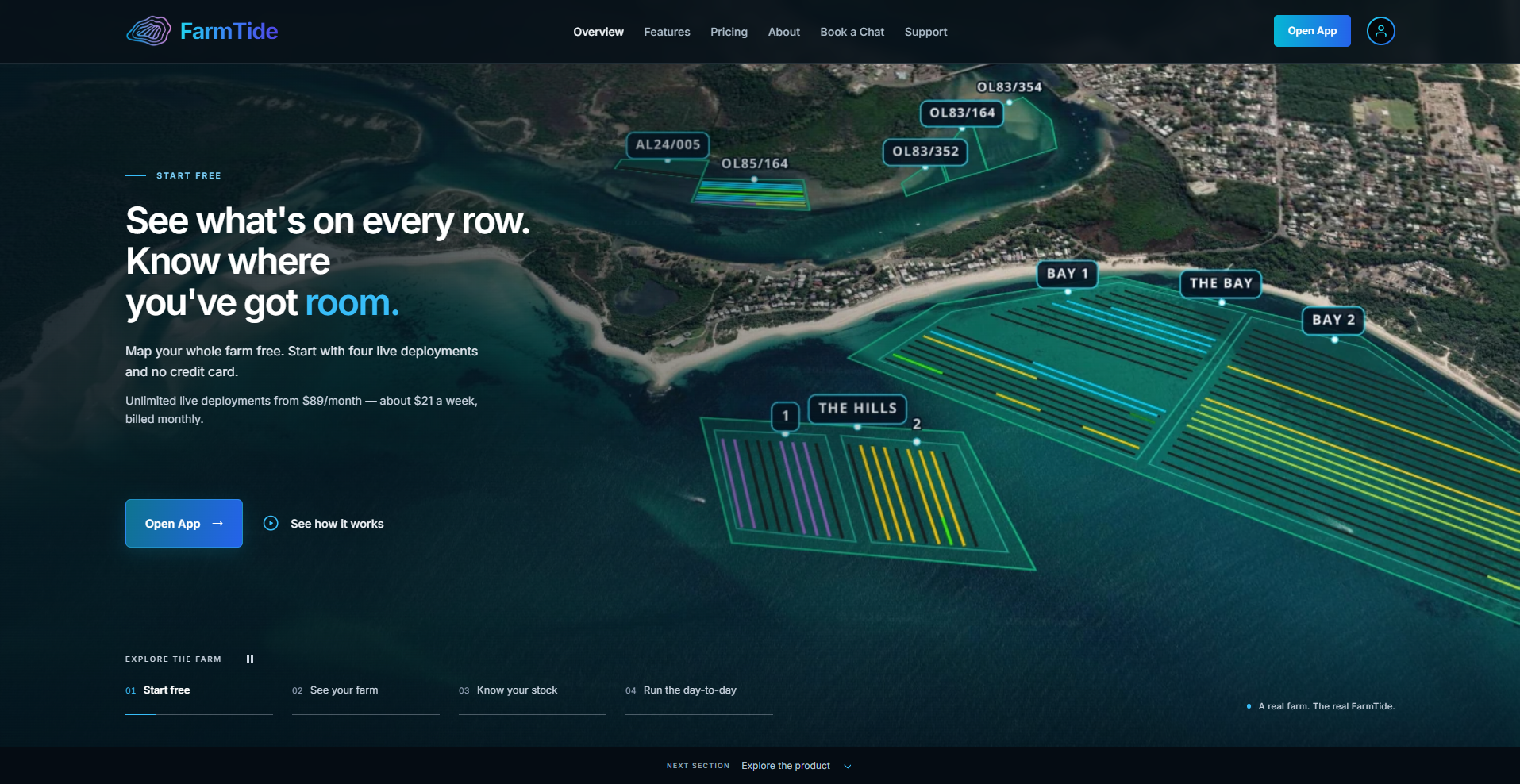
A manager should be able to look at a map, identify the leases and rows, see where stock has been deployed and understand how much space is left. Then they should be able to act on that information without navigating through a maze of disconnected screens.
That sounds simple. Getting it right means working out how the map, stock records and day-to-day operations relate to one another. Those relationships became the foundation of the product.
2. Make the map the working interface
Many systems treat a map as a pleasant extra: a set of pins showing roughly where something belongs, while the actual work happens elsewhere.
FarmTide takes the opposite approach. The map is where the farm comes together.
Farmers can map the physical layout of their operation—leases, bays, rows and the places where stock is kept. They can associate deployments with specific positions, so the view isn't just geographical decoration. It represents their recorded operation.
That lets the map answer practical questions:
- Which rows are occupied?
- What's deployed in this area?
- Where are the batches and grades I'm looking for?
- How much room do we have for the next deployment?
- What needs to be picked up or moved?
Those are operational questions. They're not about making a dashboard look modern.
There's an important limit to describe honestly: the system reflects the farm information that users enter and maintain. It isn't a magical real-time tracker that automatically knows where every basket has gone. Good records are still essential. The aim is to make those records easier to create, easier to understand and more useful when decisions need to be made.
That difference—between a map that illustrates the database and a map that helps people work with the database—is central to FarmTide.
3. Model what actually happens to stock
Mapping is only the visible half of the problem. Underneath it, stock changes over time.
A batch may be split by grade, deployed to different rows, picked up, handled and redeployed. A farmer needs enough structure to keep an accurate history without being forced to fill out an administrative form for every small decision.
The product has to represent the meaningful events and their relationship to the current state. Otherwise the map and the underlying records gradually drift apart.
That drove a lot of the design thinking: clear concepts for batches and grades, deployments tied to actual positions, and pickup and movement workflows that reflect the way farmers operate.
I also wanted the interface to answer an everyday question quickly: what's on the water right now? A farmer shouldn't need to reconstruct that answer from five reports and a spreadsheet.
This is the part of software development that rarely makes the marketing video. It's data modelling, edge cases and making sure one action doesn't quietly create a contradictory picture somewhere else.
When it works, users barely notice the structure. They just find the information they need.
4. Choose tools that fit the job
FarmTide is built with SvelteKit and TypeScript, Supabase with PostgreSQL, interactive mapping technology built around MapLibre, and Cloudflare for the web application delivery.
That stack wasn't chosen to collect fashionable logos. Each part plays a practical role.
SvelteKit and TypeScript give the interface a modern component-based foundation and help keep a growing web app understandable. Stronger typing catches certain classes of mistakes early, while the framework supports the kind of fast, responsive interaction a map-heavy application needs.
Supabase and PostgreSQL provide the data layer and authentication services. This is where careful thinking about identity, access and data integrity matters. A farm-management system can't treat 'who is allowed to change this record?' as an afterthought.
MapLibre and mapping providers make it possible to build a genuinely spatial workflow rather than an ordinary table with a map bolted onto the side.
Cloudflare provides the deployment platform for the web app, keeping delivery straightforward as the product evolves.
None of those choices guarantees a good product. A bad data model built with good tools is still a bad data model. The value is in how the pieces work together and whether the resulting system is manageable.
There's another practical benefit in building a modern web app: FarmTide can be installed on a phone as a progressive web app (PWA). Farmers can add it to their home screen through their browser without needing a separate App Store download. That removes a little friction from getting started. It doesn't mean every workflow is guaranteed to work offline; connectivity remains a real-world consideration.
5. Build for the farmer who doesn't want a manual
One thing you learn quickly is that 'easy to use' means different things to different people.
Someone comfortable with software might appreciate a rich onboarding flow, a tutorial library and advanced settings. Someone trying to manage a farm may simply want to open the app, see what's there and get on with the job.
That pushed FarmTide towards simpler setup and clearer defaults. Farm information needs to be easy to establish. The map needs to orient people quickly. Common actions need to be discoverable without an instruction manual.
The free offering follows the same thinking. A farmer can map the whole farm and record up to four live deployments without entering a credit card, starting a countdown or committing to a sales process. Pickups and redeployments can free up and reuse those slots. The point isn't to give someone a tiny, disconnected demo. It's to let them put their own farm into the software and understand whether the approach works for them.
And support matters. Not everyone wants another tutorial video. Sometimes they want to ring someone who understands the job. FarmTide offers phone help even to free accounts, because an otherwise good tool is useless if someone gets stuck at the first hurdle.
Those decisions aren't clever programming tricks. They're product decisions informed by the people who will actually use the software.
6. Where AI really changed the development process
This is where FarmTide also connects directly to SparkAhead.
AI coding agents have made it possible to tackle parts of software development much faster than I could using a completely traditional workflow. They can help translate a well-defined requirement into working components, explore alternative implementations, write tests, review changes and find issues that deserve attention.
That is a real productivity improvement, particularly for a founder building a specialist product without a large development team.
But the job doesn't become 'type one prompt and launch'. If anything, working well with these tools makes the quality of the instructions and reviews more important.
An agent doesn't inherently know the difference between how an oyster farmer describes a pickup and how that pickup must affect the underlying records. It doesn't know which extra feature would clutter a screen that needs to work on a phone, or which edge case actually matters on the water.
Those decisions still need domain knowledge.
The workflow I favour is closer to this:
Define the outcome. Be specific about what the user is trying to achieve, what must not break and what the existing code already does.
Build within a clear scope. Use AI tools to accelerate the implementation, not to justify rewriting half the product every time a new button is needed.
Review the behaviour, not just the code. Does it work in the real interface? What happens when a field is missing, an account is new or a request fails?
Test and iterate. Use automated checks where they help, manually test the workflows that matter, and correct the underlying problem rather than patching symptoms.
Keep responsibility with the developer. The tool proposes and implements; someone still has to understand and stand behind the result.
This approach is far more interesting to me than the argument about whether AI-written code is somehow automatically good or bad. The question is what quality of product we can create when skilled human judgment is combined with faster tools.
7. Real use reveals the things the mock-up missed
A design can appear perfect when every screen is filled with sample data and the developer is sitting at their own computer.
Then someone signs up with a real account on a different phone, using a different email application, and the assumptions start to show.
Getting account creation and confirmation to work cleanly across devices, making sure a new user lands in a useful setup flow, and keeping the first experience understandable are every bit as important as adding another advanced feature.
FarmTide has benefited from exactly that sort of iteration. Early farmers using the software have helped bring attention back to the practical things: the map needs to make row positions obvious; users want to see available space; the first steps shouldn't feel like administration; and getting help should be simple.
That feedback doesn't always produce a dramatic new screen. Sometimes the best improvement is removing a step, changing a default, or fixing a small piece of friction that only appears in everyday use.
Those are often the changes that make the biggest difference.
8. Reliability beats cleverness
There's a trap in building specialist software: once the foundations are working, every new idea looks irresistible.
The possibilities for a farm-management app are enormous. You could keep adding automation, reports, integrations and increasingly elaborate workflows until the simplicity that made it useful has disappeared.
I've had to keep coming back to a more basic question: does this make the farmer's day easier, or does it just make the feature list longer?
Take the general challenge of hands-free or voice interaction. It's a promising direction in an environment where users may be busy with physical work, but a clever command is no use if the wrong stock movement gets recorded. A reliable interface needs a clear confirmation path and a safe manual option. Automation must not turn uncertainty into a silent write to the database.
The same principle applies to ordinary buttons. If something changes a farm's operational record, the user should understand exactly what will happen. The app needs to be predictable before it needs to be impressive.
That's not a rejection of ambitious features. It's a reminder that specialist software earns trust by getting everyday tasks right.
9. Maintainability isn't glamorous, but it determines the future
FarmTide is a live product, not a static brochure. It will continue to evolve as farmers use it, problems are discovered and new needs become clearer.
That makes the long-term shape of the code important. A new feature should fit an understandable model rather than create another isolated system that nobody wants to touch six months later.
Some development principles have been particularly useful:
Keep the data model coherent. The current view of a farm needs to make sense alongside the events that produced it. Changing a screen shouldn't mean inventing a second version of the truth.
Treat permissions as product behaviour. Different people may need different access. Authentication alone isn't the same as authorization.
Make failures visible and recoverable. A confusing error message is a problem; a silent failed operation is worse.
Don't confuse test counts with confidence. Automated tests help catch regressions, but they don't replace trying the real workflow on the devices and connections customers use.
Protect the scope of changes. It's tempting—especially with AI assistance—to modernise unrelated code while working on a feature. That can turn a simple improvement into a new source of risk.
The goal isn't to create an untouchable masterpiece. It's to have a product that can keep improving without becoming impossible to maintain.
10. What FarmTide taught me about building for other businesses
The most important lesson wasn't a framework, a database or an AI model.
It was how much progress you can make by staying close to the real problem.
FarmTide works as a case study because the problem is concrete. Farmers need to understand their farms, their stock and their available space. There are clear workflows to build, real users to learn from, and practical consequences when the software gets something wrong.
That makes it a useful test of development philosophy.
If a feature adds complexity without helping the farmer, it probably needs another look. If a technically elegant solution is hard to explain, the interface may be wrong. If an AI agent makes implementation quicker but the result is unreliable, the time wasn't well saved.
Those lessons travel well beyond aquaculture.
A restaurant owner needs to change a menu without calling a developer. A small business needs enquiries to arrive reliably. A team needs a custom application to reflect the way work really happens, rather than forcing everyone to adapt to a generic package.
The details change. The principles don't.
Understand the work. Build the simplest useful solution. Test it in reality. Improve it without losing the original purpose.
That's what I wanted FarmTide to demonstrate—and what I want people to expect from SparkAhead.
The product is live. The learning doesn't stop.
FarmTide is available at farmtide.app, where oyster farmers can explore the product and map their own farm with a free account.
It's a real, evolving application, with all the practical lessons that come from running one: onboarding, support, data integrity, usability, maintenance and the occasional decision to not build another feature yet.
I think that matters more than pretending a product arrived fully formed from a single clever prompt.
AI has changed how quickly we can turn good ideas into working software. It hasn't removed the need to understand the people using it—or the responsibility to make the result worthwhile.
That's the story behind FarmTide, and it's the thinking behind Plan. Build. Iterate.
Explore the project: FarmTide — Oyster Farm Management
About this case study: FarmTide is a founder-built product developed by the person behind SparkAhead, included here to show an actual product, its design decisions and the engineering approach. It is not presented as an external client engagement.